Best Developer Tool Website Examples (And Why They Convert)
We scored 57 developer tool homepages on 60+ conversion criteria. See which sections separate the top performers, and what your page is probably missing.
What high-performing developer tool homepages get right
Developer tool pages face a unique challenge: they need to earn trust from technical buyers who evaluate products by reading docs and trying code, not by watching demo videos. The strongest pages in this benchmark do four jobs early:
50.4/100
Avg. page score
Make the outcome visible in the first viewport so the developer knows what the tool actually does, not just what category it belongs to.
Show the product as a real interface or code workflow, not an abstract illustration. Step-by-step implementation flows let developers evaluate the tool before signing up.
Layer proof that developers trust: GitHub stars, third-party review scores, quantified performance metrics, or verifiable comparison data.
Give builders a low-friction entry point with specific CTA language like "Start building," "See a live demo," or "Try it free," and supportive microcopy that removes signup anxiety.
6 best developer tool homepages analyzed in detail
Each company below is paired with its strongest section and scored across 60+ conversion criteria. See what they get right, and what you can borrow.
01
Cal.com, Open-source scheduling that handles the complexity so you don't have to.
5 years CRO + SEO at Qonto (2021–2025). After advising 15+ SaaS on their websites (Payfit, Pigment…), the same patterns kept breaking, so I decided to build the source of truth on what works on the web: the intelligence layer every tool, builder, and team uses to ship sites that perform.
“Cal.com turns scheduling infrastructure into a clear, step-by-step product story. The How It Works section (scored 100, top-scoring) pairs UI previews with effortless framing, "we handle the cross-referencing", so the value feels concrete before the visitor touches the product. Dual CTAs serve both self-serve and sales-led buyers.”
What makes this page stand out
Self-hosting option gives enterprises full control over their scheduling data
API-first design enables embedding scheduling into any application or workflow
Collective and round-robin scheduling handle complex team scheduling needs
Cal Atoms (UI components) allow custom-branded scheduling experiences
Section we love
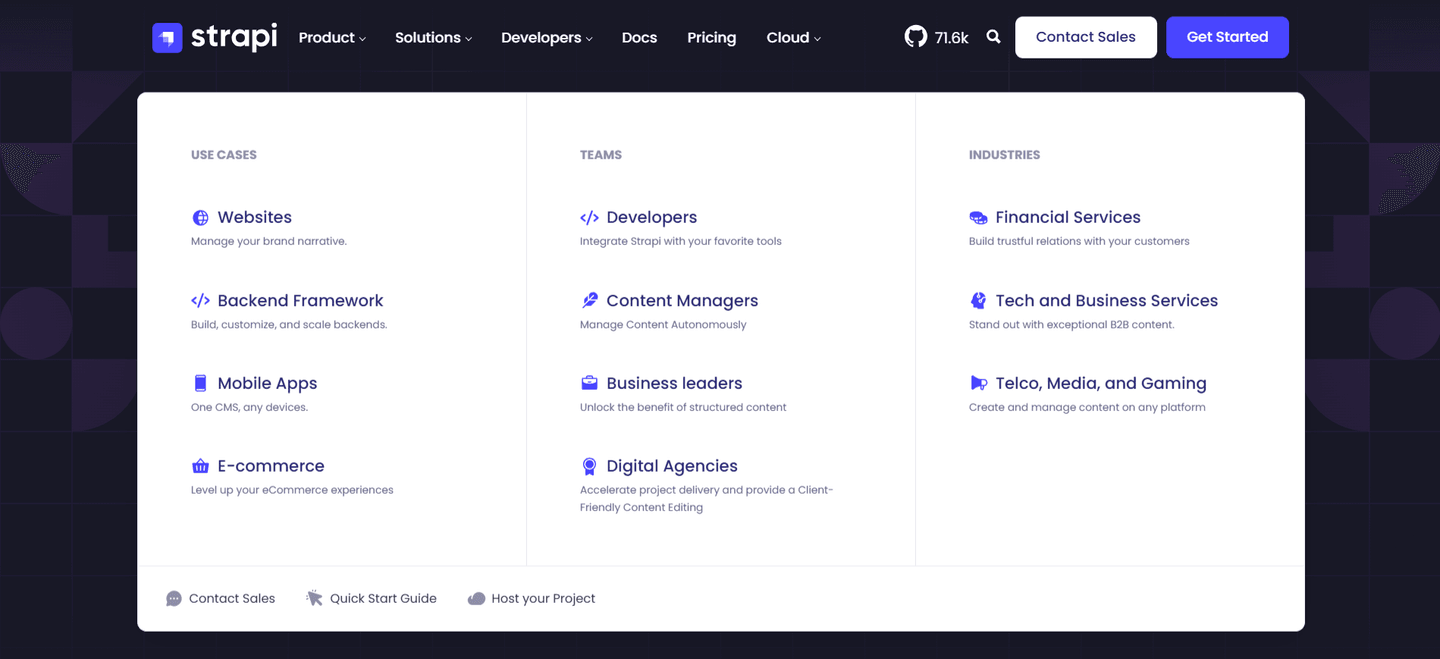
·NavbarBest in class
1Dark Get started button is the standout primary CTA, paired with a quieter Sign in link
2Pricing tab sits in the top nav for buyers ready to compare plans
3Solutions mega menu splits into By team size and By use case columns with clear headers
4Persona paths cover Individuals, Teams and Organizations while use case paths cover Recruiting, Sales, Support and more
5Featured purple Cal.ai card promotes AI-powered scheduling calls with a Try Cal.ai now badge
02
Drizz
71/100
What makes this page stand out
The hero stacks “Write. Run. Ship.” above “Reliable Mobile Test Automation. Built For Real Apps.” to clarify outcome and category.
The primary CTA is “Download for mac,” while a secondary “Schedule a demo” appears later for enterprise buyers.
Product Hunt badges highlight “Top Post” and “Featured On Product Hunt #2,” adding third-party validation in the fold.
The problem section cites “1 in 7 tests fail randomly” and links “See what Appium is costing you →”.
Section we love
·Use Cases
1Three persona cards (QA Teams, Developers, Tech Leadership) each lead with a different outcome trio (cycles, fixes, ROI)
2Tab toggle (By Persona / By Team Type) lets visitors self-select the lens that matches their role
3Four concrete bullets per persona avoid generic value-prop fluff, naming specifics like (Self-healing tests across UI changes)
4Distinct icons per persona (frame, code tags, crown) help scanners locate their card without reading
03
Tandem
70/100
What makes this page stand out
"Work together synchronously with virtual meetings, calendar alerts, high fives even while remote" adds a human touch with the "high fives" detail.
Dual CTAs ("Try Tandem for free" + "See Tandem in action") serve both hands-on and observation-first users.
The virtual office interface with meetings and team features demonstrates always-on presence, differentiating from meeting-only tools like Zoom.
Light mint gradient background creates a friendly, approachable aesthetic matching the small-team positioning.
Section we love
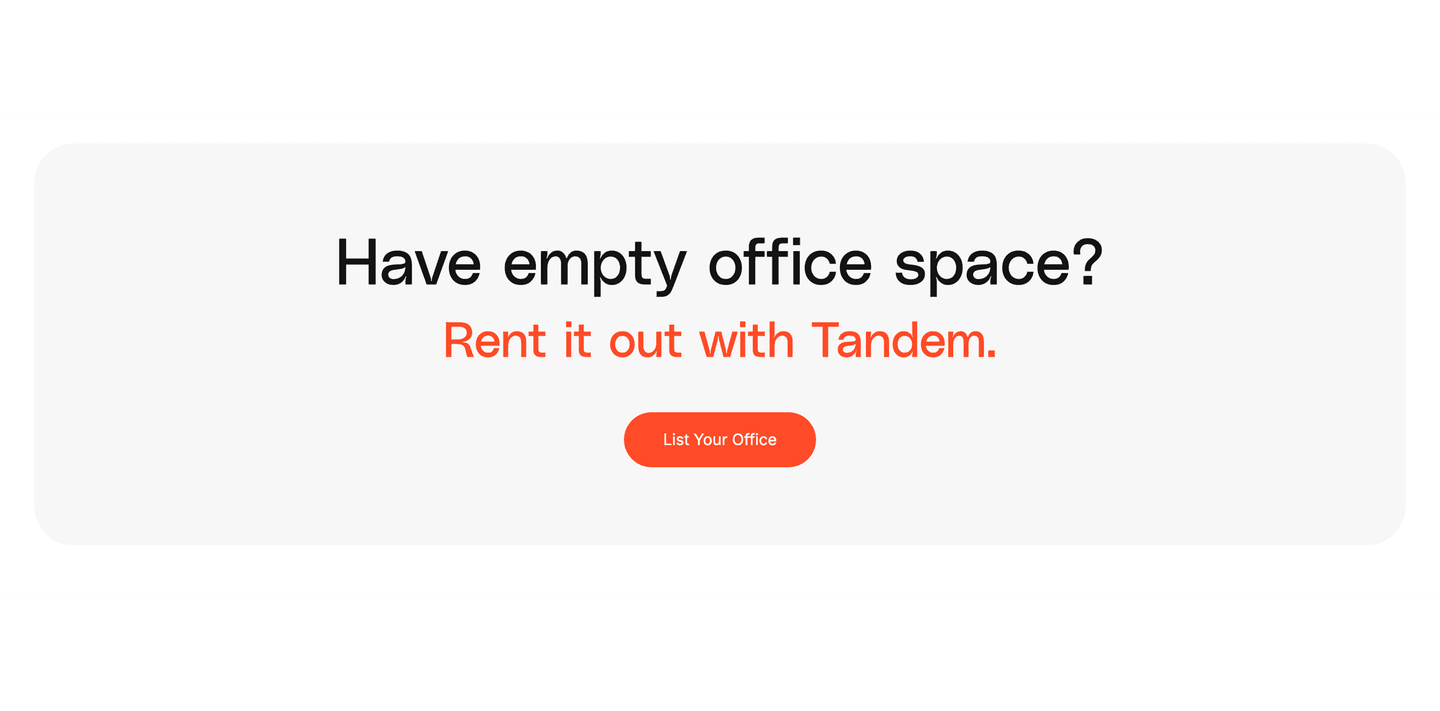
·Cta
1Single dominant CTA (List Your Office) in a high-contrast orange pill leaves one clear action
2Action-oriented button copy (List Your Office) names the exact task the visitor will do
3Question-led headline (Have empty office space?) qualifies the visitor before the ask
4Tight two-line message with the product name in brand orange keeps the block focused and scannable
04
Bugherd, Visual bug tracking that lives on your website, not in a spreadsheet.
5 years CRO + SEO at Qonto (2021–2025). After advising 15+ SaaS on their websites (Payfit, Pigment…), the same patterns kept breaking, so I decided to build the source of truth on what works on the web: the intelligence layer every tool, builder, and team uses to ship sites that perform.
“Bugherd compresses social proof, product UI, and risk reduction into a single hero viewport. The trifecta of 4.8/5 rating, 350K+ users, and 10K+ companies paired with a real kanban screenshot and a 60-day money-back guarantee makes the try-it decision feel safe.”
What makes this page stand out
Product UI screenshot showing point-click-comment workflow provides immediate visual comprehension of the tool's simplicity
Google SSO signup reduces friction to near-zero — smart for a tool targeting agencies and web teams
"Goodbye endless emails" tagline directly names the pain point being eliminated
Social proof trifecta (4.8/5 rating, 350k+ users, 10k+ companies) builds credibility across multiple dimensions
Section we love
·How It Works
1Three numbered steps (Create a project, Get the extension or install JS, Invite team and clients) cover the full setup
2Each step has a matching illustration (the board, the website snippet, a pinned feedback card) showing the real product
3The headline (Get started with BugHerd in minutes) sets a fast concrete timeframe to onboard
4Step 2 offers a low-effort path (browser extension or a single JavaScript snippet) so anyone can install it
5Step 3 previews the outcome of clients leaving pinned feedback like Make the logo bigger right on the page
05
Edgee Fallback Models
69/100
What makes this page stand out
The above-the-fold CTAs pair “Start free” with “See how it works,” offering trial and proof paths.
The terminal snippet shows the exact install command “curl -fsSL https://edgee.ai/install.sh | bash” and “✓Claude Code running with Edgee.”
The “Three failure scenarios” section names specific triggers like “Anthropic outage,” “Weekly plan limit reached,” and “credit-based billing starting June 15, 2026.”
The pricing block anchors value with “$29 per developer / month,” “14-day free trial,” and “No credit card required” repeated twice.
Section we love
·Footer
1Footer links organized into five labeled columns (Compliance, Products, Company, Support, Legal) for clean navigation
2AICPA SOC 2 and GDPR certification seals sit under a dedicated Compliance heading reassuring security-conscious buyers
3Newsletter capture with Enter your email field and a purple Subscribe button drives secondary conversion below the fold
4Privacy and Terms links under a clear Legal column keep policy access transparent
06
Bitbucket, Code and CI/CD built into the Atlassian developer platform.
5 years CRO + SEO at Qonto (2021–2025). After advising 15+ SaaS on their websites (Payfit, Pigment…), the same patterns kept breaking, so I decided to build the source of truth on what works on the web: the intelligence layer every tool, builder, and team uses to ship sites that perform.
“Bitbucket leads with platform identity and real product UI. The hero section (scored 56) shows actual code repos, pull requests, and CI/CD pipelines, making the Atlassian ecosystem story tangible rather than abstract. The "Try it now" CTA lowers the barrier to first use.”
What makes this page stand out
Deep integration with Jira creates a unique project-to-code traceability advantage
Pipelines (CI/CD) built directly into the repository platform streamline the development workflow
Free tier for small teams creates a low-barrier entry point
Code review with pull requests and inline commenting enable collaborative development
Section we love
·Hero
1Headline (Code and CI/CD powered by the Atlassian platform) nails product category in one clear line
2Real product UI showing code repository with pull requests and pipeline visualization
3Try it now CTA with free access lowers the barrier for developers to start immediately
4Differentiation claim (best-in-class Jira integration) leverages the Atlassian ecosystem advantage
See how your page compares to the 49.8 average page score
Run a diagnostic on your developer tool page and get a section-by-section breakdown of what to fix first, starting with outcome clarity, product proof, and developer trust signals.
Design patterns we see across high-performing developer tool pages
Across 57 developer tool pages reviewed, the pages that convert make the first screen do one job: show what the tool does and prove it works.
The strongest patterns pair outcome-led visuals with real product UI, then back claims with proof developers actually trust, benchmarks, comparison data, open-source metrics, or third-party review scores. Features, CTA, and Hero sections are the most common top-performing section types, while How It Works sections averaged 88.6, the highest score in the benchmark. Use website section examples to compare how these building blocks show up across page types.
Product Hunt 484-upvote badge plus (API & MCP ready) pill stack social proof and category clarity above the fold
Overlooked sections that quietly drive adoption and trust
In this set, navigation and utility sections often do more conversion work than teams expect: they shape product understanding, route developer personas, and surface use cases before visitors reach the hero.
The biggest gaps appear where the page should address the problem the tool solves. Problem sections averaged just 24 (the weakest section type in the benchmark), which forces the hero to carry the entire persuasion load. Meanwhile, pages like DevStats (navbar scored 100, top-scoring) and Plivo (How It Works scored 100, top-scoring) show that structured navigation and step-by-step flows can quietly close the trust gap.
1Three numbered steps (Describe use case, Let Vibe build the flow, Review and launch) make the build path obvious
2Each step carries a real product screenshot of the builder, flow canvas, and analysis mode so you see the tooling
3The headline (Go live with AI agents in minutes) sets a concrete fast timeframe for getting to production
4Copy stresses no code or complexity and a single click to deploy, lowering the perceived effort of building an agent
5Step 3 previews the end state of a tested agent deployed across channels
6Two CTAs (Contact Sales and Get Started Now) sit directly under the steps to capture intent
Reviewed overlooked-section pick from Plivo’s how it works section.
What I love about this section
Three numbered steps (Describe use case, Let Vibe build the flow, Review and launch) make the build path obvious
Each step carries a real product screenshot of the builder, flow canvas, and analysis mode so you see the tooling
The headline (Go live with AI agents in minutes) sets a concrete fast timeframe for getting to production
Copy stresses no code or complexity and a single click to deploy, lowering the perceived effort of building an agent
Use the examples below as prompts for what to add or restructure, not just what to redesign visually.
Checklist: a practical audit for developer tool website design
If you are iterating on a developer tool homepage, this checklist helps you spot missing sections and messaging gaps quickly, especially around Features, CTA, and Hero sections.
Run it on your current page, then decide what to rewrite, what to reorder, and what proof to add before you touch visual polish. For a faster baseline, you can also try our landing page audit.
Built from 280 sections across 57 developer tool homepages in this benchmark. Each check below is a move the highest-scoring pages share, each paired with a real example from the benchmark.
Hero
Can a developer tell what you do and try it in five seconds?
The hero makes it instantly clear what the product is and who it's for.
Example: Bugherd backs the plain category line with a social proof trifecta, a 4.8 out of 5 rating, 350K+ users, and 10K+ companies.
The real product shows above the fold.
Example: CircleCI opens on a real pipeline UI showing build statuses "Running, Failed, Success" with timestamps instead of a hero illustration.
Proof is visible before the first scroll.
Example: mailX by mailwarm goes further and lets visitors run the core domain analyzer in the hero itself, so the hero is the product.
Trust
Does the page earn belief with proof a skeptic can check?
Recognizable customer or platform logos borrow credibility.
Example: Assemblyai runs a customer logo grid of CallRail, Ashby, Delphi, and Supernormal to borrow trust from known SaaS brands.
Claims are quantified with hard numbers.
Example: Semgrep states three hard metrics, 45+ enterprise customers, a 96% security research agree rate, and a 95% user agree rate.
Security and compliance signals reassure enterprise buyers.
Example: Plivo stacks five recognized seals, HIPAA, GDPR, SOC 2, PCI DSS, and STAR, in a single compliance row.
Value proposition
Is the value concrete, or just adjectives?
Benefits are specific, tied to a real capability.
Example: DataFlint names six supported platforms, AWS EMR, Databricks, Dataproc, Microsoft Fabric, Kubernetes, and On-Premises, each on its own card.
The promise is quantified with a number or a timeframe.
Example: SlimAI anchors its value in hard numbers, 2,000+ Zero-CVE base images and production-ready patches delivered in 15-40 minutes.
Features
Do features connect to outcomes a developer cares about?
Feature copy leads with the outcome.
Example: DevStats headlines with "find where work gets stuck" and "cut your time to production" instead of naming the metric.
Each feature maps a real pain to a measurable result.
Example: Pipeshift names the pain then promises the fix with headings like "unused GPU capacity? Not anymore."
Call to action
Does the next click feel like a natural step for a developer?
The copy is action-led.
Example: Firecrawl lets one dominant orange "Start for free" button lead, with a muted gray secondary beside it.
A clear secondary path serves the buyer who is not ready yet.
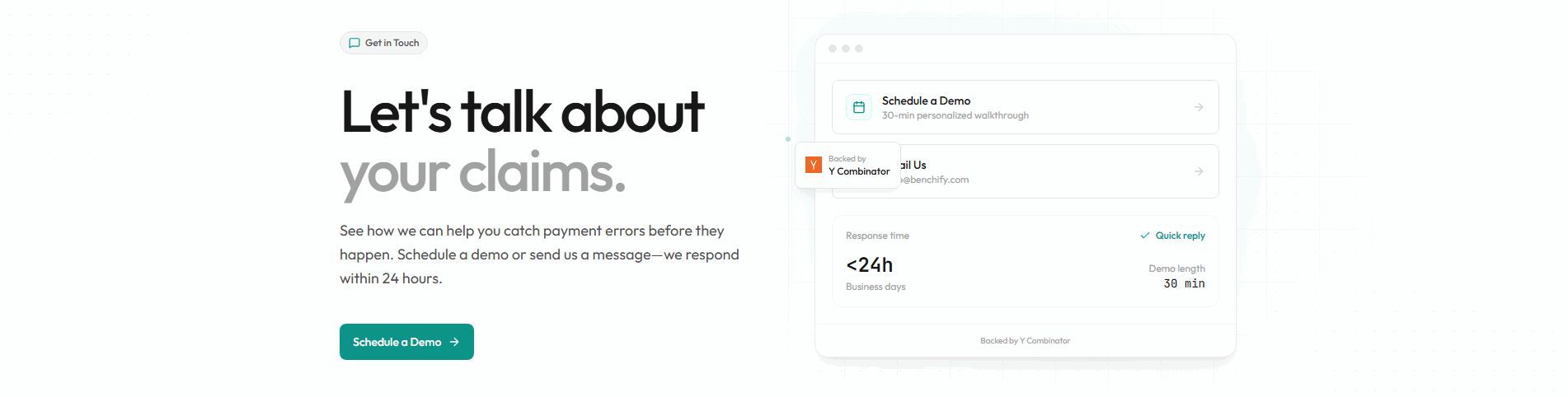
Example: Benchify leads with a green "Schedule a Demo" button and offers "Email Us" as the lighter second path.
Reassuring microcopy sits next to the button.
Example: Edgee Fallback Models stacks three reassurances under the button, "Install in 30 seconds. Works with your existing Claude Code setup. No credit card."
The gap most developer tool pages leave open is pricing.
Pricing is the rarest section in the developer tool set. Of 57 companies benchmarked, only 21 expose a pricing block clear enough to score. The ones that do make a developer's decision easy. Raycast lines up three named plans side by side, Free forever at zero dollars, Pro at 8 dollars, and Team Pro at 12 dollars per user, each with a one-line audience tagline. Pages that hide pricing behind "contact sales" leave the cheapest trust on the table.
Interactive quiz
What would your developer tool homepage score?
Question 1 of 5
0%
Can a developer identify what your tool does in under 5 seconds?
"Visual bug tracking on your live site" beats "streamline your development workflow."
Reviewed by
Gabriel Amzallag , Founder, Web Anatomy
5 years CRO + SEO at Qonto (2021–2025). After advising 15+ SaaS on their websites (Payfit, Pigment…), the same patterns kept breaking, so I decided to build the source of truth on what works on the web: the intelligence layer every tool, builder, and team uses to ship sites that perform.
See how your page compares to the 49.8 average page score
Run a diagnostic on your developer tool page and get a section-by-section breakdown of what to fix first, starting with outcome clarity, product proof, and developer trust signals.
Quick answers based on our 57-page developer tool website benchmark.
What are the best developer tool websites?
[01]
The strongest performers in this June 2026 benchmark are Cal.com, Bugherd, Benchify, Dyte, and Kinsta. Across 57 developer tool homepages scored against 60+ criteria, these pages convert by showing the actual workflow: Cal.com sequences its product story with UI previews in every step, Bugherd stacks 4.8/5 rating plus 350K+ users in the hero, and Benchify pairs side-by-side comparisons with a "No hallucinations" deterministic badge.
Why are developer tool websites harder to convert than generic SaaS pages?
[02]
Developers evaluate through docs, code samples, and hands-on trials, not marketing copy. Across 57 homepages reviewed, the pages that convert make outcomes verifiable fast: Benchify ships 10% vs 100% coverage deltas and a 87-days-to-less-than-1-second benchmark, Bitbucket shows real code repos and pipeline views instead of a diagram, and Cal.com handles the cross-referencing so scheduling complexity becomes concrete before signup.
What is the biggest design mistake on developer tool homepages?
[03]
Leading with abstract product messaging while hiding the actual interface and measurable outcomes. The average page in this June 2026 benchmark scored 49.8. Top performers replace abstraction with proof: Benchify shows the contract-to-executable comparison, Bitbucket surfaces pull requests and CI/CD in the hero, and Dyte routes Ed-tech and Telehealth buyers straight from the navbar before they ever read a headline.
What sections should a developer tool homepage include?
[04]
A hero with real product UI or code output, a How It Works flow sequencing the developer workflow, features tied to specific outcomes, trust signals developers value (GitHub stars, G2 and Trustpilot scores, benchmarks), and a low-friction CTA like "Start building" or "Try it free." Cal.com and Kinsta stack these well, while Bitbucket surfaces real pull requests and CI/CD pipelines in the hero to prove the workflow before asking for a signup.
How many developer tool examples do I need to review before redesigning?
[05]
Three to five is enough if you pick by developer category. Only 9% of sections in this benchmark score in the top tier, so the gap is concentrated in a few blocks. Study Cal.com for sequenced how-it-works flow, Bugherd for compressed trust in the hero, Benchify for verifiable comparison data, Dyte for navbar-level persona routing, and Kinsta for audience-specific scope.
Where can I find great inspiration for my developer tool website?
Use a structured rubric that checks clarity, proof, and friction instead of relying on subjective feedback. Run your page through the landing page analysis for a section-by-section score against the same 60+ criteria used in this benchmark.