We scored 10 data and analytics homepages on 60+ conversion criteria. See which sections separate the top performers, and what your page is probably missing.
What high-performing data homepage design gets right
Data pages sell to technical buyers who evaluate tools methodically. The strongest pages in this benchmark do four jobs early:
51.8/100
Avg. page score
Make the data use case obvious in the first viewport so the buyer knows whether this is a pipeline tool, analytics platform, visualization layer, or data warehouse.
Show the product as a real data workflow so the promise feels operational instead of abstract.
Layer trust cues early with integration logos, customer data volumes, or recognizable enterprise clients.
Give data teams a low-friction next step with a free tier, sandbox, or interactive product tour.
Top data homepage analyzed in detail
Each company below is paired with its strongest section and scored across 60+ conversion criteria. See what they get right, and what you can borrow.
01
Firecrawl, Web data extraction for developers and AI pipelines.
5 years CRO + SEO at Qonto (2021–2025). After advising 15+ SaaS on their websites (Payfit, Pigment…), the same patterns kept breaking, so I decided to build the source of truth on what works on the web: the intelligence layer every tool, builder, and team uses to ship sites that perform.
“Developer-first data extraction with strong product visuals. Firecrawl pairs clear API documentation with conversion-focused CTA placement and feature sections that make the developer experience tangible.”
What makes this page stand out
A pricing promo link offers “2 Months Free — Annually” directly from the header area.
The hero headline says “Power AI agents with clean web data” and highlights “It’s also open source.”
The trust strip claims “Trusted by 150,000+” and shows logos like Shopify, Canva, Apple, and Zapier.
The performance section cites 96% web coverage and P95 latency of 3.4s, linking to “See benchmarks”.
Section we love
·Cta
1Dominant orange Start for free button is clearly primary over the muted gray secondary
2Action-led copy (Start for free) tells the visitor the exact next step
3Reassuring microcopy (No credit card needed) sits right above the buttons to kill last-minute doubt
4Lower-commitment second path (See our plans) catches visitors not ready to sign up yet
02
Alteryx
46/100
What makes this page stand out
Alteryx One unification narrative (analytics + AI + governance) positions as the single pane of glass — in a fragmented data tool landscape, "one seamless platform experience" directly addresses tool sprawl fatigue
"Code-free analytics automation" expands the buyer persona beyond data engineers — empowering business analysts to self-serve reduces bottleneck dependencies and resonates with business unit leaders frustrated by IT backlogs
Alteryx Copilot AI assistant modernizes the user experience — AI-powered workflow creation captures the generative AI momentum while grounding it in practical analytics automation use cases
Deep platform integrations (Snowflake, Databricks, OpenAI) positions Alteryx as the workflow layer — rather than competing with data platforms, Alteryx orchestrates across them, making it complementary rather than competitive
Section we love
·Resources
1One large featured article (The Logic Layer) plays against a stacked side list, creating clear visual priority
2Every article maps to the product domain (AI governance, data readiness, analytics) so resources reinforce the core value prop
3Category tags (Technology, People, Strategy) plus (Read More) links route readers deeper into the content funnel
4Thought-leadership angles (The Missing Piece in Modern AI Tech Stacks, AI Data Readiness) position Alteryx as an authority
See how your page compares to the 51.8 average page score
Run a diagnostic on your data page and get a section-by-section breakdown of what to fix first to improve clarity, trust, and product proof.
Design patterns we see across high-performing data pages
Across 10 data pages reviewed, the pages that convert tend to make the first screen do one job: name the data use case and show the product handling real data workflows.
The strongest patterns pair clear technical claims with product visuals that feel real, then back those claims with integration logos and enterprise client examples that data teams can verify. Data website design works best when it bridges the gap between infrastructure complexity and visible output. Use website section examples to compare how these building blocks show up across page types.
Six distinct badges mix analyst recognition, awards, and a review-site rating for broad proof diversity
Gartner Peer Insights Customers Choice 2025 and Dresner Best in Class signal enterprise-grade standing
Overlooked sections that quietly drive clarity and trust
In this set, pricing, FAQ, and footer sections often do more conversion work than teams expect: they shape evaluation decisions, answer common technical questions, and keep the buying journey coherent for methodical evaluators.
The biggest gaps usually appear where the page should explain pricing tiers and integration fit clearly. When those sections are thin, data teams stall because they cannot evaluate total cost and technical compatibility.
1Links grouped into 4 labeled columns (Products, Use Cases, Documentation, Company) for easy navigation
2SOC II Type 2 status with an AICPA SOC 2 badge reinforces security and compliance trust
3Bottom row links to Terms of Service, Privacy Policy and Report Abuse for clear policy access
4Backed by Y Combinator note and an All systems normal status indicator add extra credibility
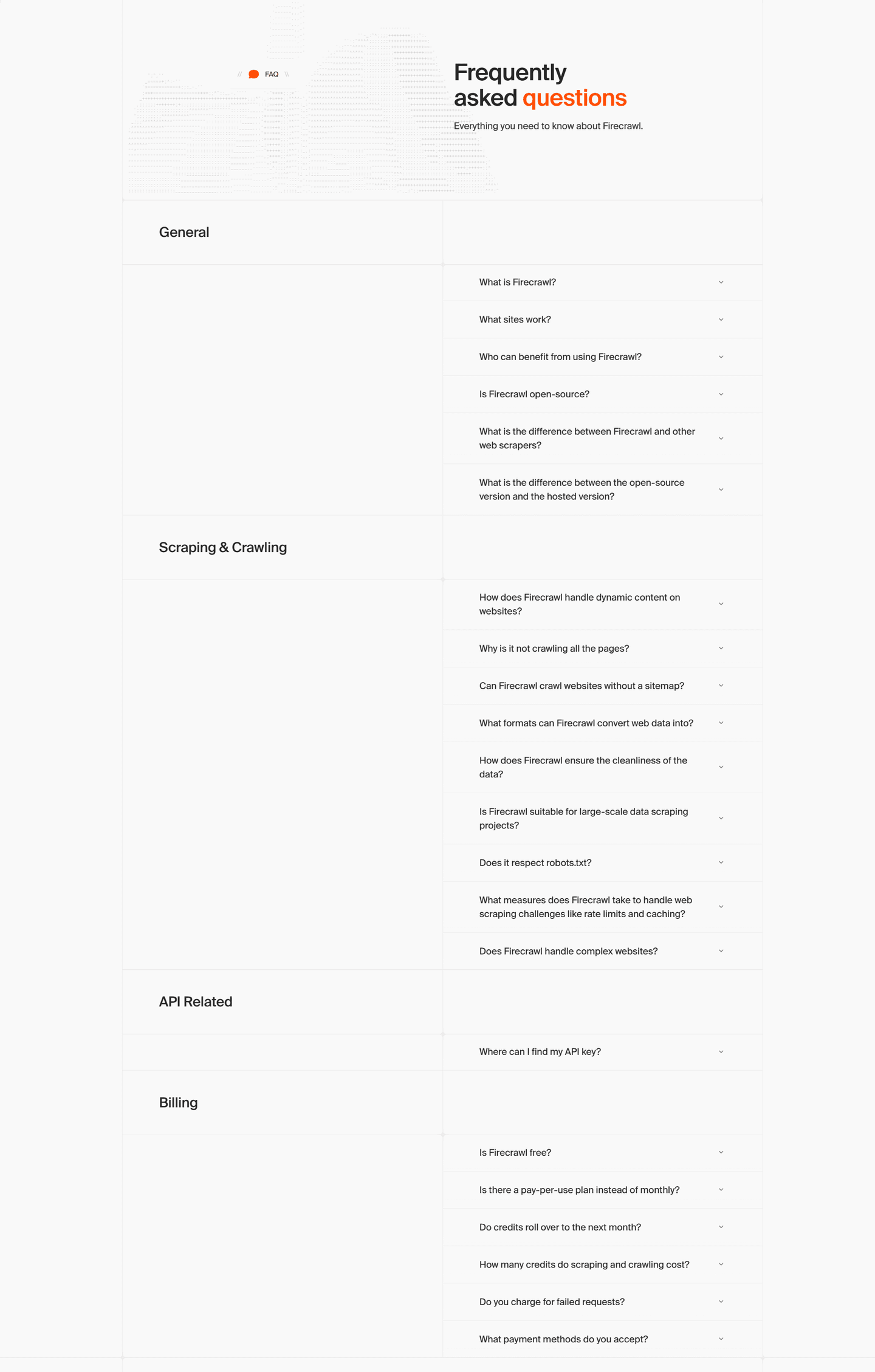
Reviewed overlooked-section pick from Firecrawl’s footer section.
What I love about this section
Links grouped into 4 labeled columns (Products, Use Cases, Documentation, Company) for easy navigation
SOC II Type 2 status with an AICPA SOC 2 badge reinforces security and compliance trust
Bottom row links to Terms of Service, Privacy Policy and Report Abuse for clear policy access
Backed by Y Combinator note and an All systems normal status indicator add extra credibility
Use the examples below as prompts for what to standardize, not just what to redesign.
Checklist: a practical audit for data website design
If you are iterating on a data homepage design, this checklist helps you spot missing sections and messaging gaps quickly, especially around Value Proposition, Trust, and Cta.
Run it on your current page, then decide what to rewrite, what to reorder, and what proof to add before you touch visual polish. For a faster baseline, you can also try our landing page analyzer.
Interactive quiz
What would your data homepage score?
Question 1 of 5
0%
Can a data team identify what you do in under 5 seconds?
"Automated data pipelines for analytics teams" beats "unlock the power of your data."
Reviewed by
Gabriel Amzallag , Founder, Web Anatomy
5 years CRO + SEO at Qonto (2021–2025). After advising 15+ SaaS on their websites (Payfit, Pigment…), the same patterns kept breaking, so I decided to build the source of truth on what works on the web: the intelligence layer every tool, builder, and team uses to ship sites that perform.
Quick answers based on our data website benchmark dataset.
What are the best data websites?
[01]
The strongest performers in this June 2026 benchmark are Fivetran, Firecrawl, Databricks, and Snowflake, with Tableau leading on visualization-as-output and Splunk on observability. Across 10 data homepages scored against 60+ criteria, these pages convert by showing the workflow (pipelines, queries, or dashboards) instead of promising abstract platform power.
What makes data websites harder to convert than other B2B pages?
[02]
Data buyers are technical evaluators who need to see integration fit and the actual workflow before committing budget. Across 10 homepages reviewed, the pages that convert bridge infrastructure complexity with visible output: Firecrawl pairs API docs with product visuals to make the developer experience tangible, Fivetran puts the pipeline in the hero, and Snowflake treats performance as a concrete number instead of a claim.
What is the biggest design mistake on data homepages?
[03]
Leading with abstract platform language like "unlock the power of your data" instead of showing what the product actually does. The average page in this June 2026 benchmark scored 51.8. Top performers replace abstraction with proof: Fivetran shows the pipeline, Databricks segments features by technical role, and Tableau leads with the visualization output itself so a buyer can evaluate in ten seconds.
What sections should a data homepage include?
[04]
A hero that names the data use case, an early trust layer with integration logos or customer data volumes, a product workflow preview (pipeline view, query interface, or dashboard), use-case routing for engineers versus analysts versus scientists, and a low-friction CTA like a free tier or sandbox. Databricks segments roles well; Fivetran makes the pipeline the hero. Across 10 homepages, the pages that stack these blocks convert most.
How many data examples do I need to review before redesigning?
[05]
Three to five is enough if you pick by theme and compare section by section. Only 0% of homepages in this benchmark score in the top tier, so the gap is concentrated in a few blocks. Study Fivetran for pipeline clarity, Firecrawl for developer positioning, Databricks for multi-role segmentation, Snowflake for enterprise trust, and Tableau for output-first visualization.
Where can I find great inspiration for my data website?
Use a structured rubric that checks clarity, trust, and friction instead of relying on subjective feedback. Run your page through the landing page audit for a section-by-section score against the same 60+ criteria used in this benchmark.